
UX Design
To B Platform
IoT in Logistics
JD Logistics
A Collection of B2B Design Projects at JD Logistics
The Context
This is a case collection, presenting several representative projects I worked on during my three-month internship at JD Logistics.
Despite the fast-paced environment and the early-stage nature of the team, I quickly adapted to B-end workflows, handled fragmented yet business-critical tasks, and developed a solid understanding of data-intensive logistics scenarios.
This collection is organized into two main modules — Data Visualization and Government Relationship Management (GRM). Each project, though small in scope, captures a key aspect of my growth in enterprise product design.
My Role
Interaction Designer
The team
JDL Design Center
Duration
3 months
Data Visualization
Case1: In-city Delivery Dashboard
Business Context
As the in-city delivery platform grows, the number of merchants, stores, and orders continues to increase. This brings a stronger need for real-time data monitoring and multi-dimensional analysis. A clear and reliable data view is essential for understanding operations and supporting day-to-day decisions.
User Needs
Merchant / Store Operators: Monitor abnormal orders in real time.
Managers: Track, record, and review operational data.
Decision-makers: Identify issues in the delivery process and optimize based on data.
Design Thinking
Support the different needs of the three key roles—store operators, managers, and decision-makers—throughout their daily operations.
Improve and complete the core functions of the in-city delivery dashboard.
As the data module of B2B tools, the dashboard serves as the most core functionality. Functioning as the first page where users engage with data, it acts as the gateway to data products, fulfilling the vital role of providing an overview and guiding analysis. This enables users to quickly assess business conditions, supporting them in making decisions and taking action.
Case1-1 Real-time Dashboard
Highlight the key points and guide users into deeper analysis.

We followed one core principle: surface key insights and guide further analysis.
The dashboard gives users a clear view of the current business status and allows them to drill down into specific issues, connecting the whole data platform together.
Case1-2 Merchant Data Module
Adapt to different users and their specific use cases.
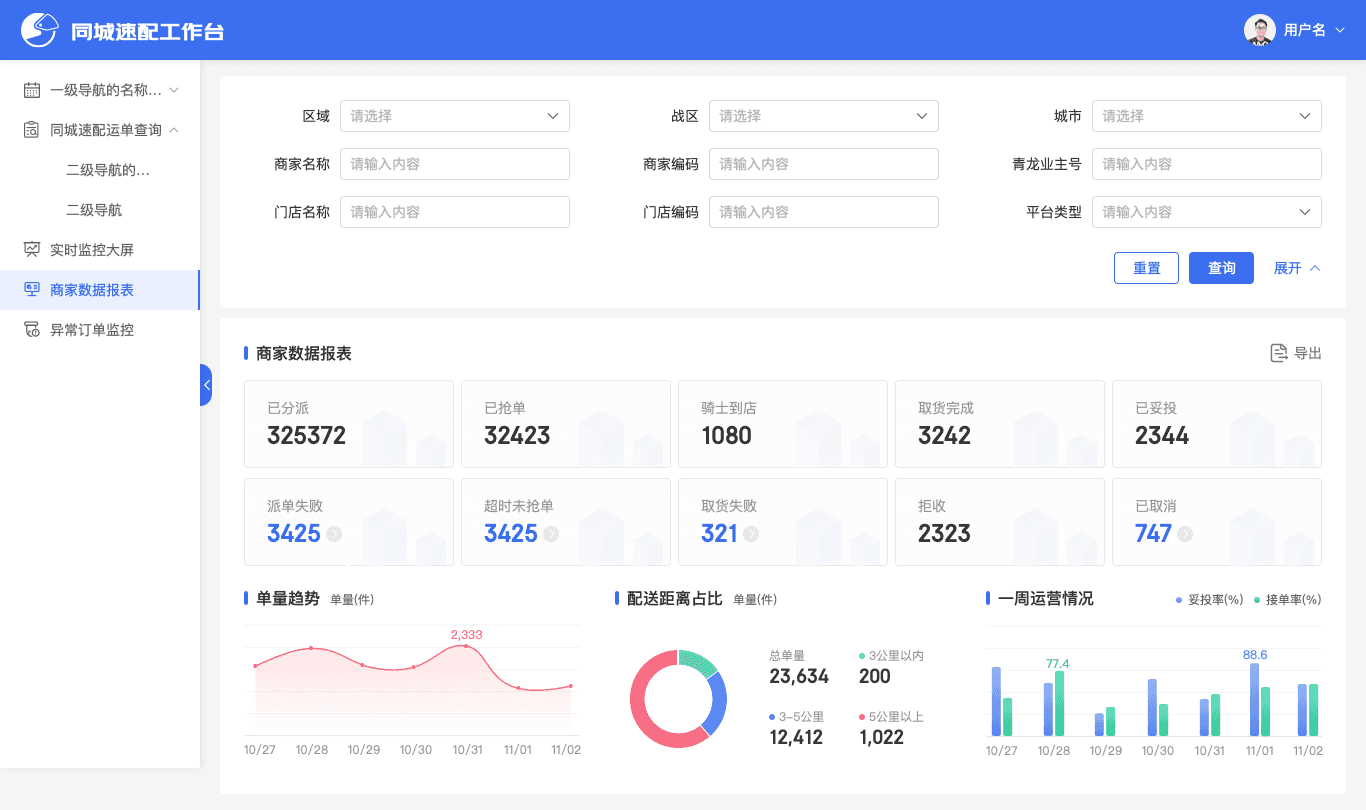
Use simple and easy-to-read metrics.
Complex metrics may look advanced, but when something goes wrong, they don’t clearly show the root cause.
Use ratio-based metrics.
For example, the ratio of order amount / campaign spend gives a clearer view of cost efficiency. It helps evaluate whether the investment is effective, prevents resource waste, and improves overall economic performance.
Use paired metrics.
When focusing on one metric, introduce another one to balance it.
For example, when tracking new users, we also monitor acquisition cost to avoid overspending just to hit the target.
Case1-3 Exception Order Monitoring
Less is more, distinguish primary from secondary.

Focus on the core scenarios of abnormal order monitoring.
Break away from the typical filter form and highlight the key filters to make them more visible and easier to use.
Case2: Cold-Chain Vehicle Map Monitoring
Business Context
The goal is to solve the current pain points and improve the efficiency of transportation resource scheduling.
We need to provide operators with a tool that is easy to use, clear to read, and effective for monitoring abnormal vehicles.
User Needs
This feature is designed for fleet monitoring and operations staff.
It helps them view vehicle status more clearly, complete monitoring tasks efficiently, and make quick decisions when alarms appear.
Goals
1. Let users search for a specific vehicle based on filters and monitor its delivery status.
2. Help users quickly understand the alert situation across all regions and respond to abnormal vehicles through the map overview.
Thinking
1. Since vehicle density is high, we needed a clear visual solution.
We grouped vehicle information with numeric bubbles when the map becomes crowded. This keeps the map readable and guides users to zoom in.
The map also follows a four-level regional structure that matches the user’s mental model.
2. All vehicles (both normal and abnormal) are displayed, but with different interactions based on user needs.
Abnormal vehicles are shown as alert bubbles and can be clicked for details.
Normal vehicles are hidden by default; users can hover to see the count and decide whether to explore further.
The map is another way of presenting dashboard data.
It gives a more intuitive view, especially for key indicators such as normal and abnormal vehicle status.
With this visual overview, operators can understand the situation at a glance, respond quickly, and keep the transportation system running smoothly.
Case2-1 Cold-Chain Vehicle Map
Home View
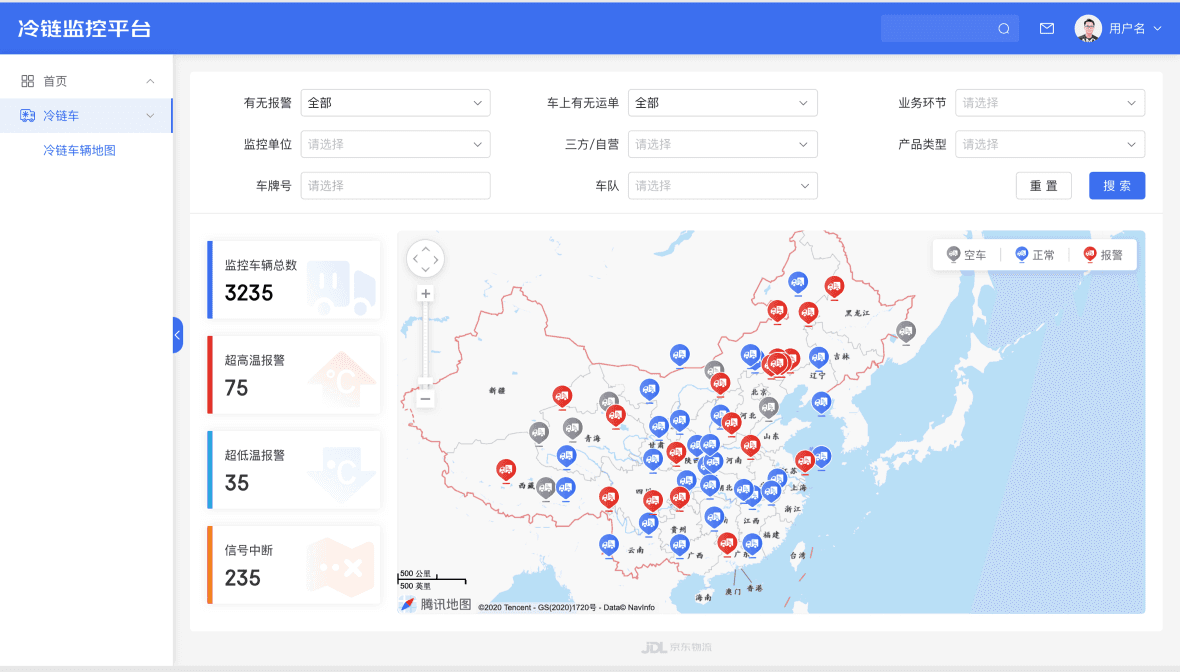
The map provides a clear and effective way to view the data.
As the home view, it helps operators see the overall situation and focus on abnormal vehicles.
The map shows both the location and status of each vehicle, allowing users to spot issues directly without going through extra filters and jump straight to the target area.
Case2-2 Cold-Chain Vehicle Map - Zoom in
Zoom Focus & Auto-updated Data

Map-level grouping helps solve the problem.
The main challenge was the large amount of vehicle data, which made the map too dense to read in a single view.
Our solution was to divide the map into four zoom levels and group vehicles based on density.
When a group contains more than 10 vehicles, it stays clustered; smaller groups are expanded as users zoom in.
This creates a clear and structured way to present all vehicle information.
Case2-3 Vehicle Status & Alert Routes
Home View

Alert vehicles are shown with high-saturation red routes and labels, making them easy to spot.
In the info card, alert details are displayed first to help users focus on the most important issues.
Government Relationship Management
Case - WuCan System(GRM for JDL)
As JD Logistics expanded, the Public Affairs team took on larger and more complex government projects.However, their relationship data and project records were scattered across different tools, making it hard to see the full picture.To solve this, we created the WuCan System—a centralized platform that maps government relationships, streamlines project management, and presents revenue insights through a clear, unified dashboard.

Design Goals
1. Ensured that each functional module had a clear information structure and consistent interaction patterns across the system.
2. For the Government Relations module, I focused on the map visualisation.
By refining the layout and information hierarchy, the map presents data in a way that is both efficient to read and easy to understand.
3. For functional pages—such as search forms and data tables—I followed desktop design conventions to keep inputs, filters, and results consistent and predictable throughout the platform.
1 - Government Relationship Management
1-1 Home — Government Relations Map — Nationwide

Highlight 1 — A clear nationwide overview
Users can instantly understand the national government relationship landscape through the map, making the information easier to scan and interpret.
Highlight 2 — Direct access to provincial and city contacts
Users can quickly reach the right government contact by interacting directly with the map.
When hovering, each province is highlighted with a raised effect, and a double-click takes the user into that province’s detailed relationship view.
1-2 Home — Government Relations Map — Province

Supporting Information Design
Additional elements, such as relationship rankings, help strengthen the overall visual narrative.
When designing these visual components, it’s important to consider how the information connects to the main data.
This gives users a clear path to follow and helps them understand the content more quickly.
1-3 Government Relationship Table

Filter records through the form
2 - Government Project Management
Government Project Detail

Project States

Multiple project states are displayed in a clear and visual way, allowing users to understand progress at a glance and follow updates in real time.
3 - Government Resource Management
National Institutions Management

The module helps managers record potential partner institutions and available resources in advance.
By centralizing this information, it empowers operation and planning teams to identify new opportunities more efficiently.
Outcome & Learnings
Outcome
The dashboards and GRM maps I designed were reviewed and adopted by the product team, improving how operators locate issues, read key metrics, and make daily decisions. Several interaction patterns and data layouts were directly taken into development as the new standard.
Learnings
Through these projects, I learned how to structure messy operational data into clear, actionable views, how to make design trade-offs under technical constraints, and how to communicate decisions quickly with PMs and engineers. Most importantly, I learned that B-end UX is about reducing steps and reducing confusion, not about adding UI.😊